Get your Flutter build onto a tester's phone.
Build your APK or IPA with Flutter, upload it to App Dropper and send one install link to your testers. New versions stay under the same project.
$ flutter build apk --release✓ Built build/app/outputs/flutter-apk/app-release.apk (42.6MB)$ npx appdropper upload build/app/outputs/flutter-apk/app-release.apkApp Dropper · app-release.apk (40.6 MB)✓ Rally 2.4.2 (326) is liveInstall link https://appdropper.io/rally
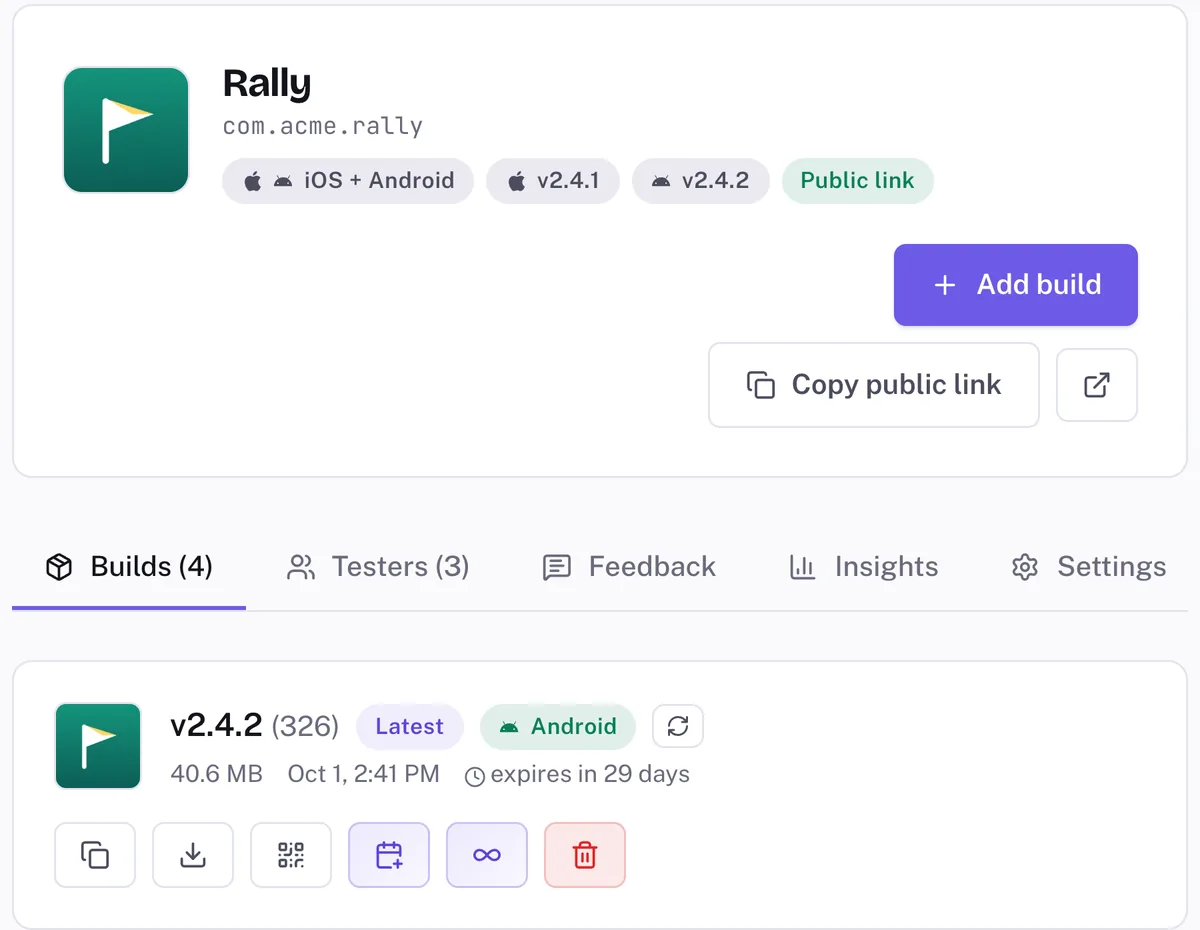
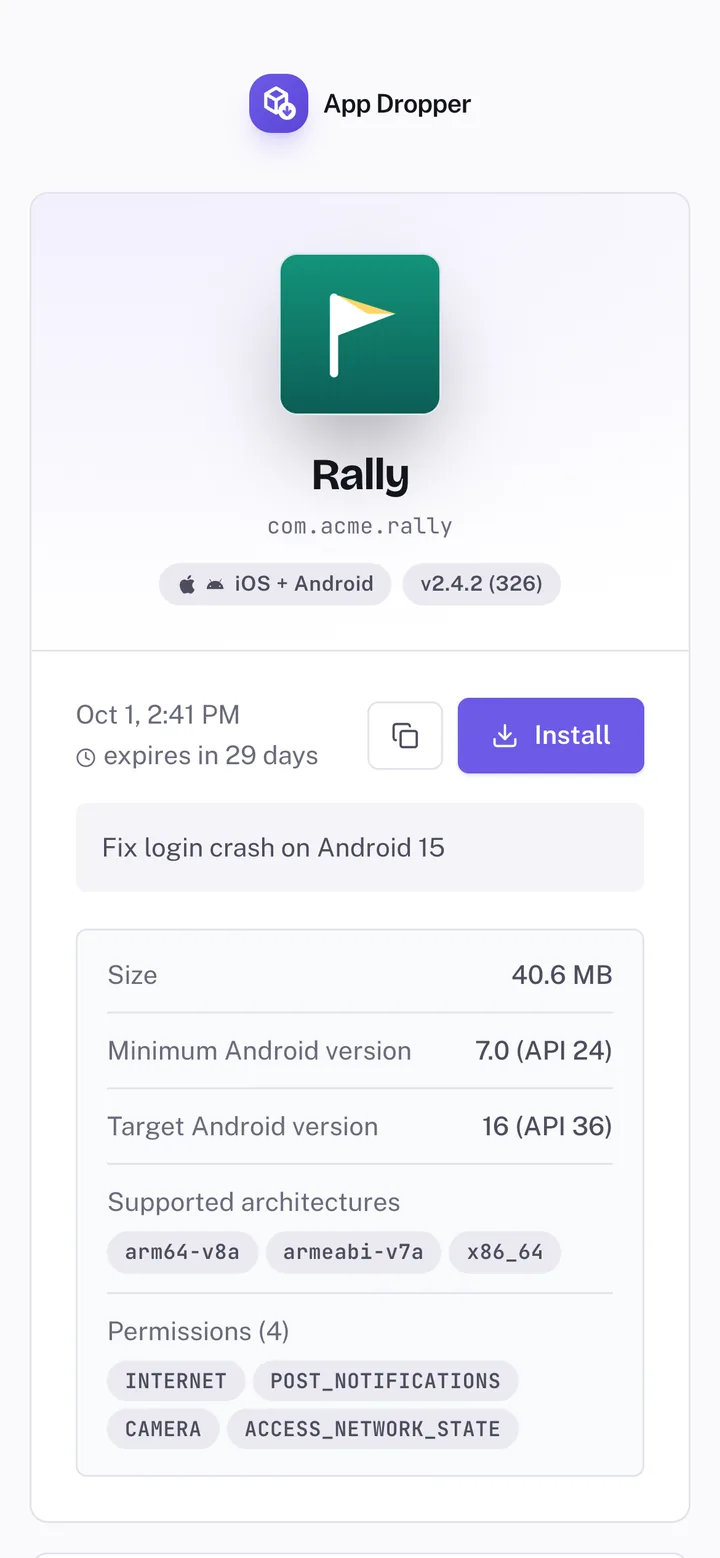
Rally is a demo Flutter app. The terminal output, dashboard and install page are real App Dropper, showing the same build.
From flutter build apk to a tester’s Android phone
flutter build apk --release produces one APK with native code for arm64-v8a, armeabi-v7a and x86_64. That single file covers every phone your minSdk allows, and the emulator too. It’s the one to send.
flutter build apk --release
# build/app/outputs/flutter-apk/app-release.apk

npx appdropper upload build/app/outputs/flutter-apk/app-release.apk
What happens after the upload
- App Dropper reads the APK: app name, icon, the application ID, and the version. Flutter puts
version: 2.4.2+326frompubspec.yamlinto the APK as versionName 2.4.2 and versionCode 326, and that’s what testers see. - The application ID picks the project. The first upload of
com.acme.rallycreates it; every later one joins it. - The CLI prints the install link and a QR code. The dashboard has both too.
- Everyone on the project gets an email, and a push notification if they use the App Dropper tester app.
- The tester opens the link and taps Install. The first time, Android asks them to allow installs from their browser. That’s Android’s rule for any APK from outside Google Play.
More on sharing APK files, or Flutter’s own Android release guide.
An .aab won't install from a link
flutter build appbundle makes an Android App Bundle for Google Play. Play generates and signs device specific APKs from it. A phone can’t install the .aab itself, so App Dropper takes APKs. Point the CLI at a bundle and it stops you:
✗ Only .apk and .ipa builds can be uploaded (got .aab).
If you’re testing the exact Google Play delivery path, use a Play testing track. If you just need today’s Flutter build on five phones, an APK is the useful artifact.
--split-per-abi changes the build number
Split APKs are smaller, but Flutter adds 1000 × the ABI number to versionCode. Build 326 comes out as 2326 in app-arm64-v8a-release.apk (1326 for armeabi-v7a, 4326 for x86_64), and that is the build number App Dropper shows. For testers, the single APK is simpler.
Check which key signed it
A new flutter create project signs release builds with your debug key: look for signingConfigs.getByName("debug") in android/app/build.gradle.kts. Testers can install that. The trouble comes with the next build. Android only installs an update over an existing app when the signing key matches, and debug keys differ from machine to machine. A build from CI won’t install over one from your laptop, and testers end up uninstalling. Set up a release keystore before builds go out.
The IPA is only half the iOS story
flutter build ipa archives the app and exports an IPA. Left alone it exports for the App Store, and an App Store IPA won’t install from a link. For testers, ask for an ad hoc export. That needs an Apple Distribution certificate and an ad hoc provisioning profile.
flutter build ipa --release --export-method ad-hoc
# archive: build/ios/archive/
# IPA:     build/ios/ipa/

npx appdropper upload build/ios/ipa/*.ipa
What App Dropper can’t change
- The IPA has to be signed already. App Dropper doesn’t sign or re-sign.
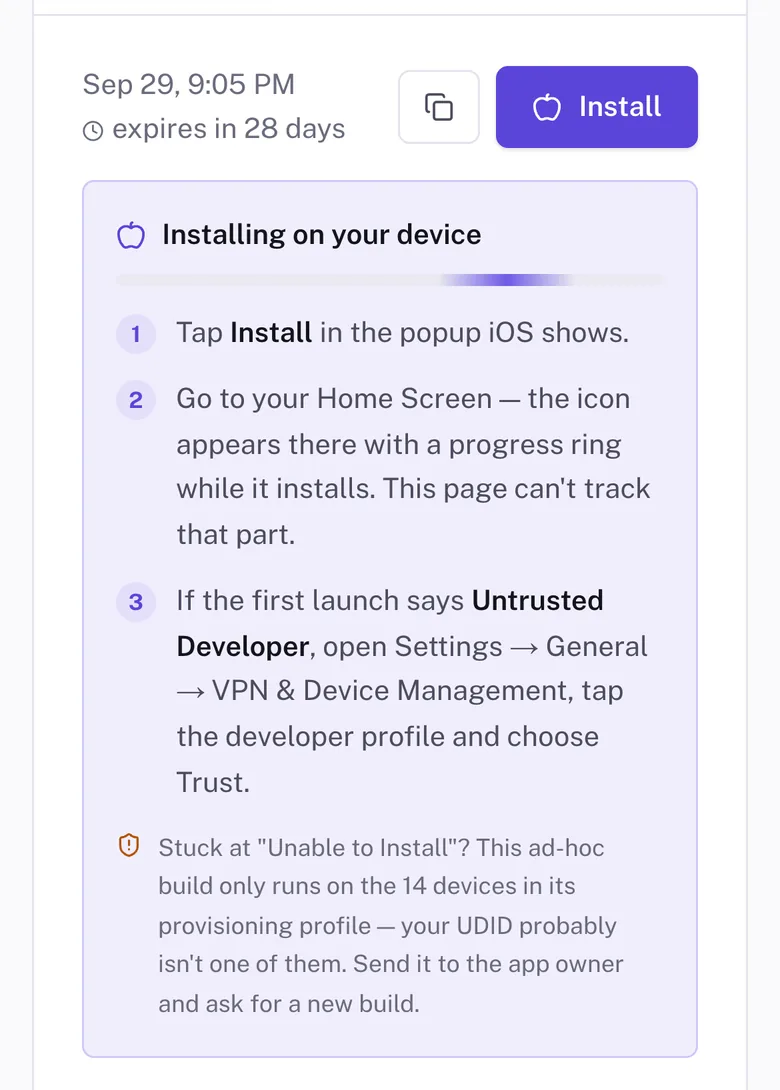
- An ad hoc build installs only on devices whose UDIDs are in its provisioning profile. Apple allows 100 registered devices per product family per membership year.
- A new tester means: register their device, regenerate the profile, export again, upload again. Same project, same link.
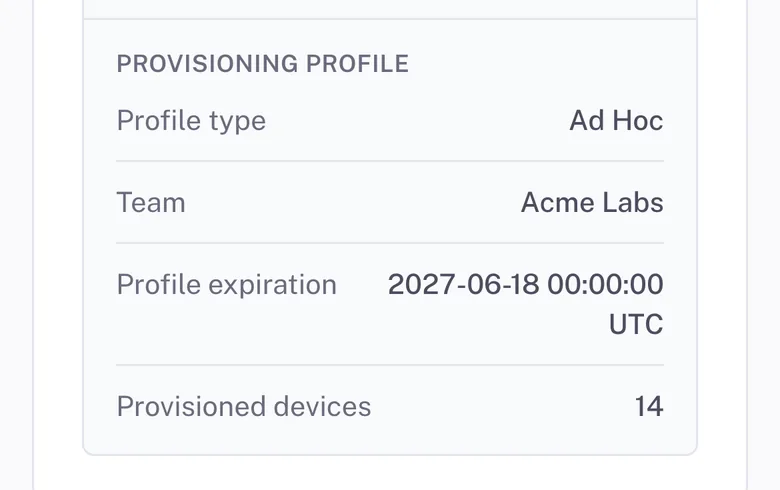
- When the provisioning profile expires, the app stops opening on testers’ phones. App Dropper shows the expiry date, so you know when to rebuild.
- A development export also installs on registered devices, but those testers have to turn on Developer Mode. Enterprise builds are only for your own organisation’s staff.
If a tester’s iPhone isn’t in the profile, uploading the IPA doesn’t make it installable. Nothing does, short of a new build signed with a profile that includes it.
What App Dropper does
It reads the provisioning profile embedded in the IPA when you upload. The install page shows the profile type, the team, the expiry date and how many devices the profile covers. When a tester taps Install, the page tells them what “Unable to Install” most likely means and asks them to send you their UDID.
Adding a tester’s UDID, IPA uploads, and Flutter’s iOS release guide. Apple covers the profile side in distributing to registered devices.
One Flutter app, two ways onto a phone
Android
flutter build apkRelease build, signed with your key
app-release.apk
One file, three ABIs
App Dropper
Reads the APK, files it by application ID
Browser download
Tester opens the link and taps Install
Installed
After allowing installs from the browser once
iOS
flutter build ipaWith --export-method ad-hoc
Signed IPA
Carries the ad hoc profile and its UDIDs
App Dropper
Reads the IPA and its profile, files it by bundle ID
Install link
Tester opens it in Safari and taps Install
Apple checks the device
Signature valid, profile current, this UDID listed
Installed
Or Unable to Install, if the UDID isn't there
flutter create gives both platforms the same identifier: com.acme.rally is the Android applicationId and the iOS PRODUCT_BUNDLE_IDENTIFIER. App Dropper groups builds by that identifier, so the APK and the IPA land in one project behind one link, and the page offers each phone the build it can install.
Already in the terminal? Stay there.
The appdropper npm package needs Node 18 or newer, and npx runs it without installing anything. You log in once per machine. After that an upload is one command, and it waits until the build is processed before printing the link.
In CI there’s no browser to log in with, so the CLI reads an API token from APPDROPPER_TOKEN instead.
Full CLI reference: every flag, exit codes and JSON output.
npx appdropper upload build/app/outputs/flutter-apk/app-release.apkThe first time, run npx appdropper login. It opens your browser to approve the CLI and saves a token in ~/.appdropper/config.
flutter build ipa --release --export-method ad-hoc
npx appdropper upload build/ios/ipa/*.ipa
Flutter exports one IPA into build/ios/ipa/, so the shell glob resolves to that file before the CLI sees it.
npx appdropper upload build/app/outputs/flutter-apk/app-release.apk \
  --notes "$(git log -1 --pretty=%B)"
Testers see the notes on the install page, in the email and in the tester app.
URL=$(npx appdropper upload build/app/outputs/flutter-apk/app-release.apk)
echo "Install: $URL"
Only the install link goes to stdout. Progress, the summary and the terminal QR code go to stderr, so the capture stays clean.
Every push to main, on a phone
Build on the runner, then hand the APK to the App Dropper action. Create an API token in the dashboard and save it as the APPDROPPER_TOKEN repository secret.
name: Tester build

on:
  push:
    branches: [main]
  pull_request:

# Lets the action comment the install link on the PR.
permissions:
  contents: read
  pull-requests: write

jobs:
  android:
    runs-on: ubuntu-latest
    steps:
      - uses: actions/checkout@v7

      - uses: actions/setup-java@v6
        with:
          distribution: temurin
          java-version: '17'

      - uses: subosito/flutter-action@v2
        with:
          channel: stable
          cache: true

      - run: flutter pub get
      - run: flutter test
      - run: flutter build apk --release

      - name: Upload to App Dropper
        uses: appdropper-io/upload-action@v1
        with:
          file: build/app/outputs/flutter-apk/app-release.apk
          token: ${{ secrets.APPDROPPER_TOKEN }}
Fastlane, Bitrise and CircleCI work too: Fastlane, Bitrise, CircleCI. Token setup for all of them is in Set up CI uploads.
The pull request comment
On a pull request from a branch in the same repository, the action comments the install link, the APK name, the commit and a QR code. The next push edits that comment instead of adding another. A reviewer scans it and tries the branch on their own phone.
Fork PRs don’t get repository secrets, so they can’t upload. That’s GitHub’s rule, not ours.
Every upload becomes the project’s newest build and notifies its testers. If PR builds shouldn’t reach everyone, build a staging flavor for PRs, or only upload when a PR has a label. Uploads also count toward your plan’s hourly limit: 5 an hour on Free, 30 on Pro, and 60 on Studio.
GitHub Actions guide, including an iOS job.
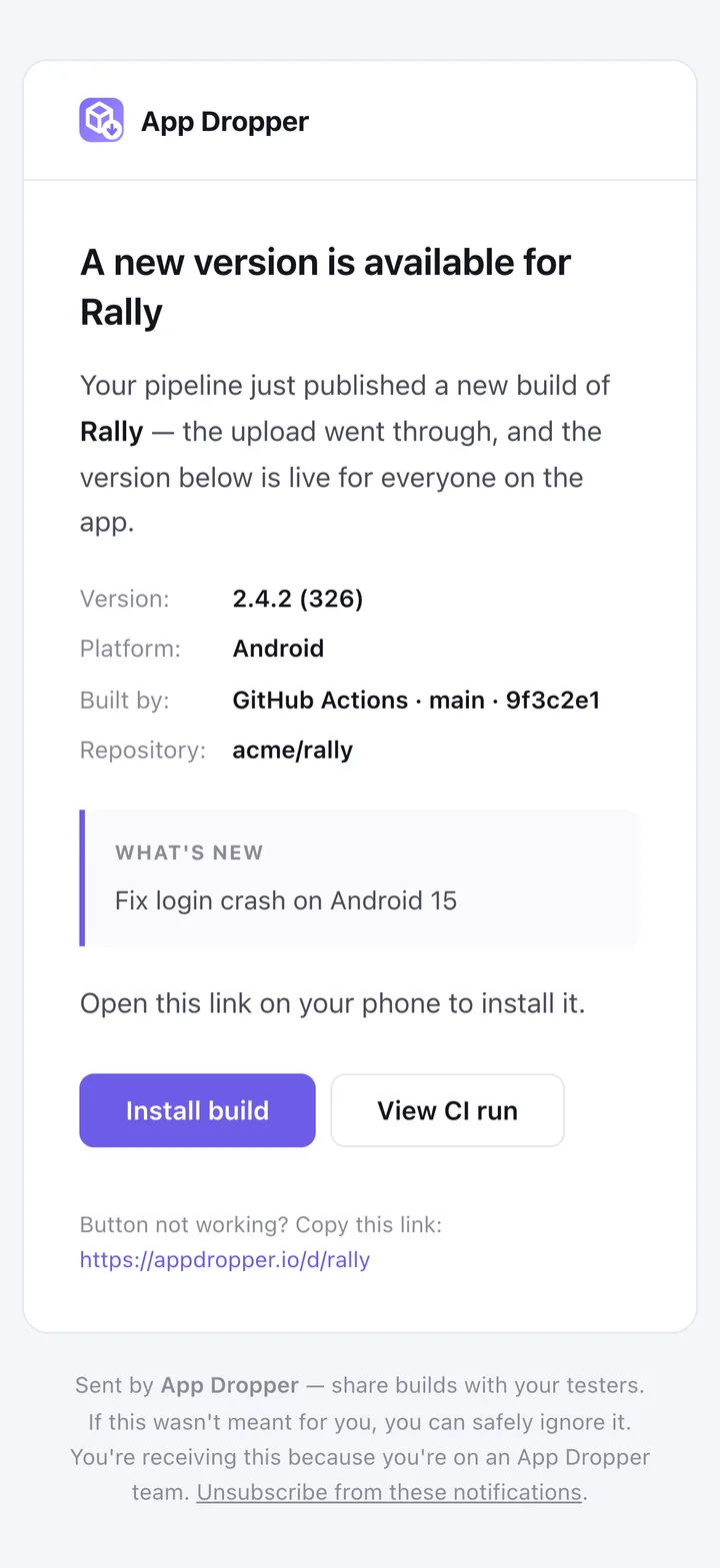
Codemagic builds it. App Dropper hands it out.
App Dropper doesn’t replace Codemagic. Codemagic checks out your code, signs and builds the binary. The last script step passes that binary to App Dropper, and testers get a link.
Put APPDROPPER_TOKEN in an environment variable group, mark it Secure, and list the group under environment.groups. Defining it at app level isn’t enough on its own.
Codemagic guide, including the workflow editor route and branch conditions. Codemagic’s own Flutter quick start covers the build side.
workflows:
  ios-testers:
    name: iOS ad hoc
    instance_type: mac_mini_m2
    environment:
      flutter: stable
      groups:
        - appdropper            # holds APPDROPPER_TOKEN
      ios_signing:
        distribution_type: ad_hoc
        bundle_identifier: com.acme.rally
    scripts:
      - name: Apply the ad hoc profile
        script: xcode-project use-profiles
      - name: Get packages
        script: flutter pub get
      - name: Build IPA
        script: |
          flutter build ipa --release \
            --export-options-plist=/Users/builder/export_options.plist
      - name: Upload to App Dropper
        script: |
          npx appdropper upload build/ios/ipa/*.ipa \
            --notes "$(git log -1 --pretty=%B)"
ios_signing fetches the ad hoc certificate and profile you set up in Codemagic, and xcode-project use-profiles writes the export options the build step reads. See Codemagic’s iOS signing docs.
workflows:
  android-testers:
    name: Android APK
    environment:
      flutter: stable
      groups:
        - appdropper            # holds APPDROPPER_TOKEN
    scripts:
      - name: Get packages
        script: flutter pub get
      - name: Build APK
        script: flutter build apk --release
      - name: Upload to App Dropper
        script: |
          npx appdropper upload build/app/outputs/flutter-apk/app-release.apk \
            --notes "$(git log -1 --pretty=%B)"
Codemagic’s machines already have Node, so there is nothing to install first.
dev, staging and production as separate projects
If your app builds flavors and each one has its own application ID, App Dropper treats each as its own app, because that’s what it is. Android does the same, which is why a tester can have staging and production installed side by side.
// android/app/build.gradle.kts
android {
    flavorDimensions += "default"
    productFlavors {
        create("dev") {
            dimension = "default"
            applicationIdSuffix = ".dev"
        }
        create("staging") {
            dimension = "default"
            applicationIdSuffix = ".staging"
        }
        create("production") {
            dimension = "default"
        }
    }
}
On iOS it’s the same idea with Xcode schemes: give each Release-staging style build configuration its own Product Bundle Identifier (Flutter’s iOS flavor guide), then build with flutter build ipa --flavor staging --export-method ad-hoc.
flutter build apk --release --flavor staging
# build/app/outputs/flutter-apk/app-staging-release.apk

npx appdropper upload build/app/outputs/flutter-apk/app-staging-release.apkcom.acme.rally.dev--flavor dev, own linkcom.acme.rally.staging--flavor staging, own linkcom.acme.rally--flavor production, own link
- Nothing App Dropper specific is happening here. Different identifier, different app. Flavors that share an identifier share a project.
- Unless you give each flavor its own label, all three show up as “Rally” on the tester’s home screen. A
resValuefor the app name in each product flavor fixes that. - If your API token is limited to selected apps, add each flavor’s project to it.
Version 2.4.2 does not need another WhatsApp link
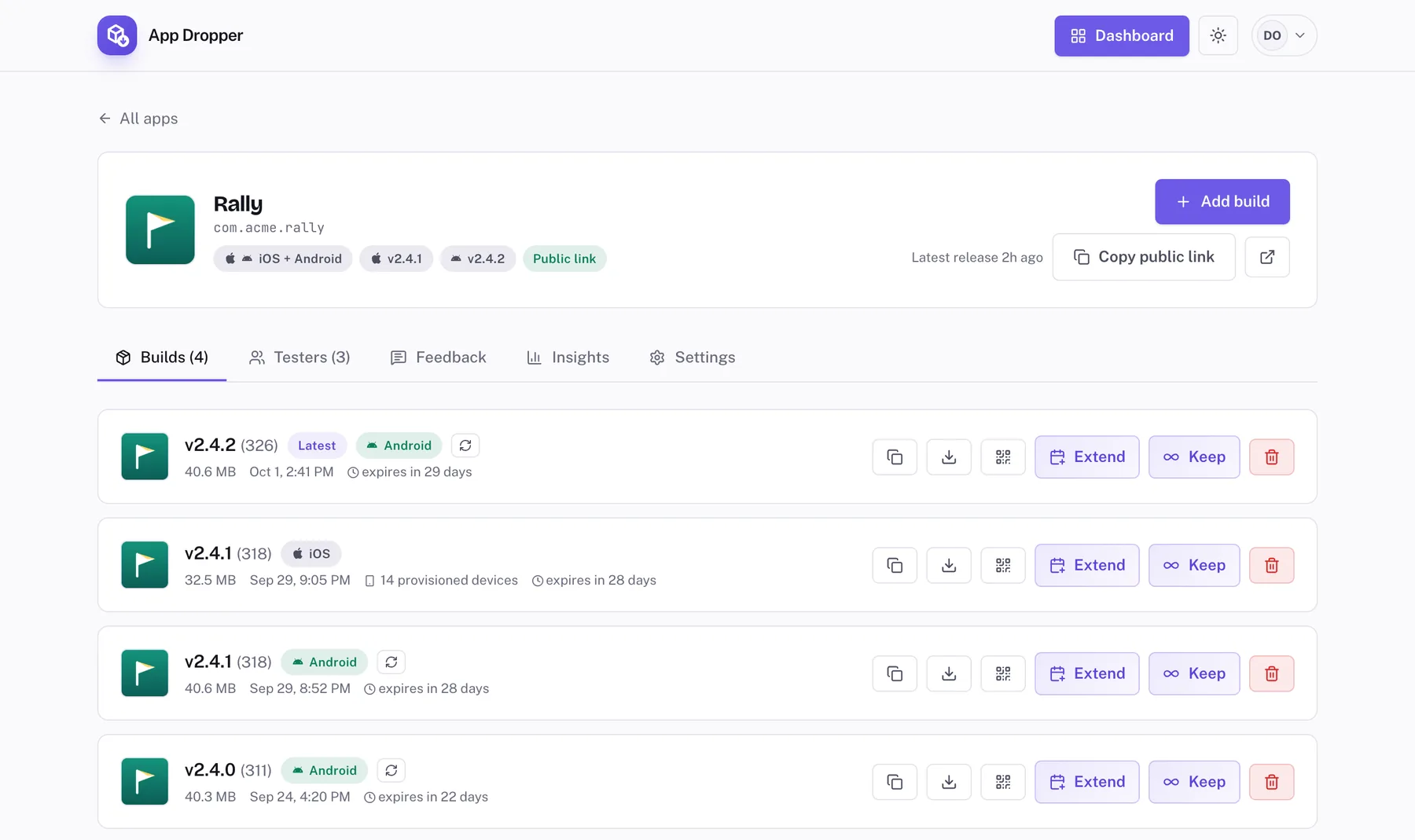
Every upload is filed by its bundle ID. Builds 311, 318 and 326 of com.acme.rally sit in one project, with the iOS build alongside. The project link doesn’t change and always opens the newest build, so you send it once: pinned in the team channel, in the README, in the client’s brief.
Older builds stay listed under the latest one, each with its own link, until they expire (7 days on Free, 30 on Pro, 90 on Studio). Need a tester back on 2.4.1? Send that version’s link. Managing versions
What happens on the other phone
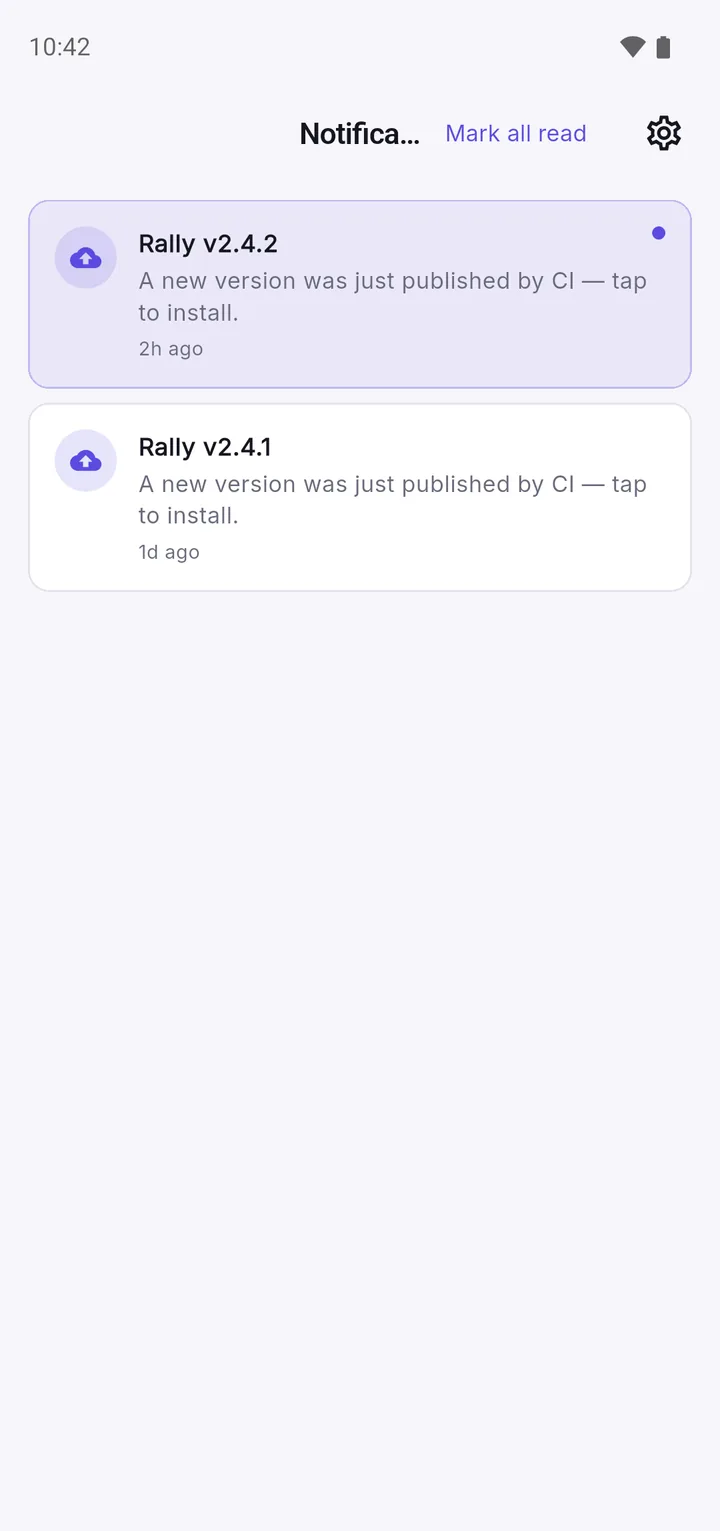
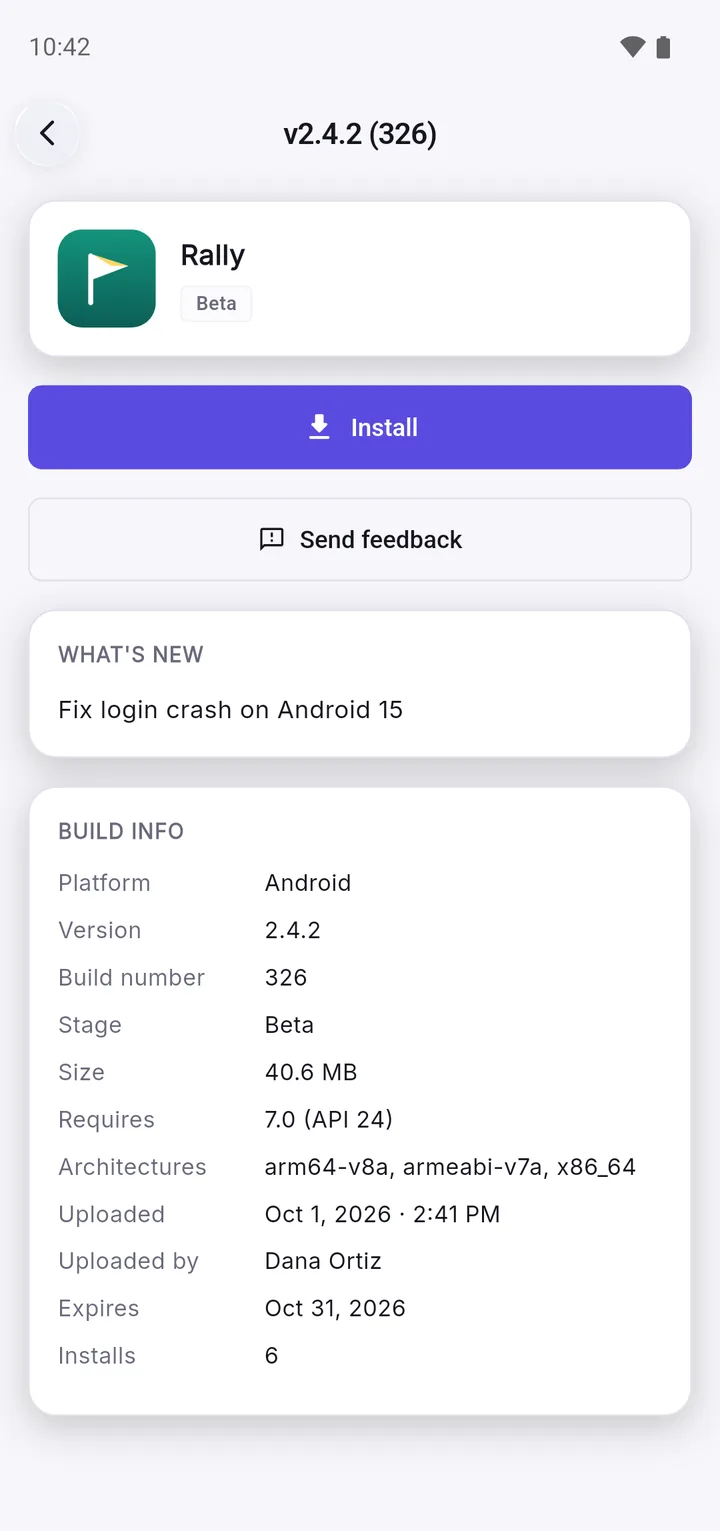
Testers don’t need anything installed: the link works in the phone’s browser. If they use the App Dropper tester app, which is itself built with Flutter, they also get a push for each new build, the release notes, and a feedback thread per build that you read in the dashboard. Inviting testers
1. New build
The push lands in the tester app's notification list.
2. Notes, then Install
Your --notes text, the build details and the Install button.
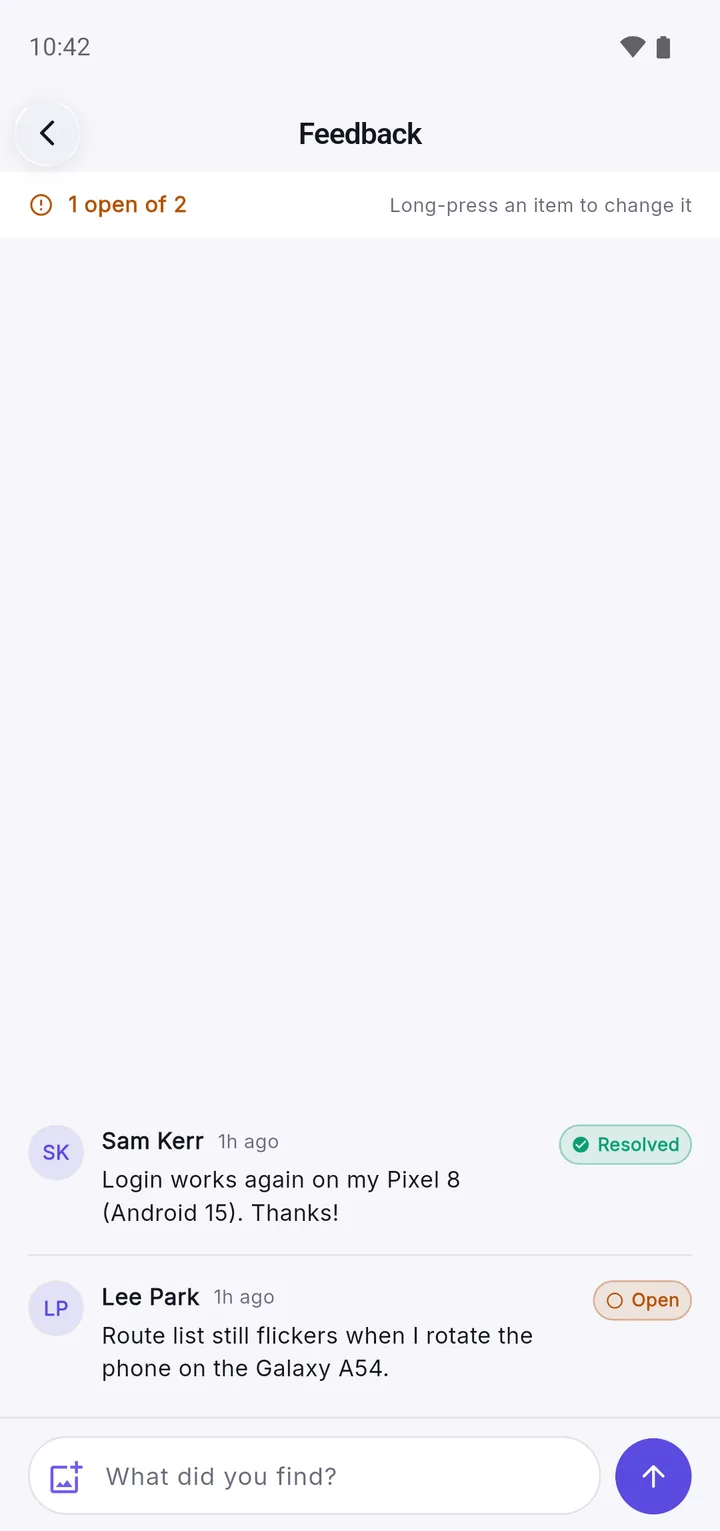
3. Feedback
One thread per build, marked open or resolved.
When App Dropper is the wrong tool
flutter install- The phone is on your desk and plugged in.
flutter installputs the build on it directly. There’s nothing to upload. - Google Play internal testing
- You need to test what Play actually delivers: the app bundle turned into per-device APKs, Play App Signing, in-app updates, billing, anything that depends on installing from the store.
- TestFlight
- You want Apple’s own beta flow: no UDIDs to collect, public TestFlight links, testers managed in App Store Connect. External testers wait for Beta App Review. How the two compare
- Firebase App Distribution
- Your team already lives in the Firebase console and wants distribution next to the rest of its Firebase tooling.
Where App Dropper fits
Between flutter run and a store submission. Today’s APK for the QA team. An ad hoc IPA for a client demo. A build for a stakeholder who has no Play or TestFlight invite, or a remote tester in another time zone. Release candidates can still go through a store testing track.
A normal Tuesday
You fix a bug.
flutter test
flutter build apk --release
npx appdropper upload build/app/outputs/flutter-apk/app-release.apk \
  --notes "Fix login crash on Android 15"
App Dropper prints the install link.
Your tester opens the same link they used yesterday and gets 2.4.2.
That’s it.
Flutter distribution questions
How do I distribute a Flutter APK to testers?
Build it with flutter build apk --release, which writes build/app/outputs/flutter-apk/app-release.apk. Then get that file onto their phones through something they can open on the device: a distribution service such as App Dropper or Firebase App Distribution, or a Google Play testing track if you build an app bundle instead. With App Dropper you upload the APK from the dashboard, the CLI or CI, and send testers the install link.
How do I share a Flutter IPA with testers?
Export it for ad hoc distribution with flutter build ipa --export-method ad-hoc. The IPA lands in build/ios/ipa/. A tester can install it from a link only if their device UDID is in the ad hoc provisioning profile it was signed with. For testers whose devices you can't register, TestFlight is the route.
Where does Flutter put the release APK?
build/app/outputs/flutter-apk/app-release.apk. With --split-per-abi you get app-armeabi-v7a-release.apk, app-arm64-v8a-release.apk and app-x86_64-release.apk in the same folder. A flavor adds its name, for example app-staging-release.apk.
Where does Flutter put the IPA?
flutter build ipa writes the Xcode archive to build/ios/archive/ and the exported IPA to build/ios/ipa/.
Can I distribute a Flutter app without Google Play?
Yes, as an APK. Android installs an APK from any source once the user allows their browser or file manager to install unknown apps. What you can't hand out that way is an app bundle: an .aab has to go through Google Play, or bundletool, before a phone can install it.
Can I distribute a Flutter app without TestFlight?
Yes, with ad hoc distribution. Register the testers' devices in your Apple Developer account, sign the IPA with an ad hoc profile that includes them, and put it behind an install link. Apple allows 100 registered devices per product family per membership year. Enterprise distribution is the other route, but only for your own organisation's staff.
Does App Dropper support Flutter apps?
It supports what Flutter produces: APK and IPA files. App Dropper never sees your Dart code. It reads the finished binary, exactly as it would for an app written in Kotlin or Swift.
Can Flutter builds be uploaded automatically from GitHub Actions?
Yes. After flutter build apk, add the appdropper-io/upload-action@v1 step with the APK path and an APPDROPPER_TOKEN repository secret. On pull requests from the same repository it also comments the install link and a QR code.
Can I use App Dropper with Codemagic?
Yes. Add a script step that runs npx appdropper upload with the path Codemagic built, and keep APPDROPPER_TOKEN in a secure environment variable group that the workflow lists. Codemagic still builds and signs the app.
Does App Dropper support Flutter flavors?
Through their identifiers. If each flavor has its own Android application ID and iOS bundle ID, each one becomes its own project with its own link. Flavors that share an identifier land in the same project.
Can testers install an iOS IPA on any iPhone?
No. An ad hoc or development IPA installs only on devices listed in its provisioning profile. An enterprise IPA installs on any device but is only allowed for internal distribution. An App Store export doesn't install from a link at all.
Is an APK the same as an AAB?
No. An APK is an installable package. An AAB (Android App Bundle) is a publishing format: Google Play generates and signs optimised APKs from it for each device. Google Play has required app bundles for new apps since August 2021. For a direct install you need the APK.
Not covered here? The knowledge base goes deeper, and Flutter lists build services in its continuous delivery guide.
Your Flutter build is already in build/.
Upload the APK or IPA and send the install link to whoever needs to test it.
Drag & drop your build
or browse files — .apk or .ipa, up to 150 MB