App Center is gone. Your builds still need somewhere to go.
Upload an APK or IPA and you get an install link for your testers. Upload the next version and it lands behind the same link. No distribution groups to rebuild, no SDK to add.
Drag & drop your build
or browse files — .apk or .ipa, up to 150 MB
Microsoft retired Visual Studio App Center on March 31, 2025.
Microsoft retired Visual Studio App Center on March 31, 2025. If you were mainly using App Center to send Android and iOS builds to testers, that leaves a fairly specific problem to solve. Here’s how App Dropper handles it.
If you used App Center for distribution, this is probably what you need
Upload your APK or IPA
Drag it into the browser, or push it from the command line or your CI.
App Dropper reads the build details
App name, icon, version, build number and bundle ID come out of the binary. On iOS it also reads the provisioned device UDIDs.
Get one project link
Builds are grouped into a project by bundle ID. The project gets an install link and a QR code.
Send it to your testers
Share the link, or invite testers by email and keep the project limited to them.
Upload the next version to the same project
Same bundle ID, same project. You don't create anything new.
Testers get the new build
They get an email, and a push notification if they use the tester app. The link they already have now opens the new version.
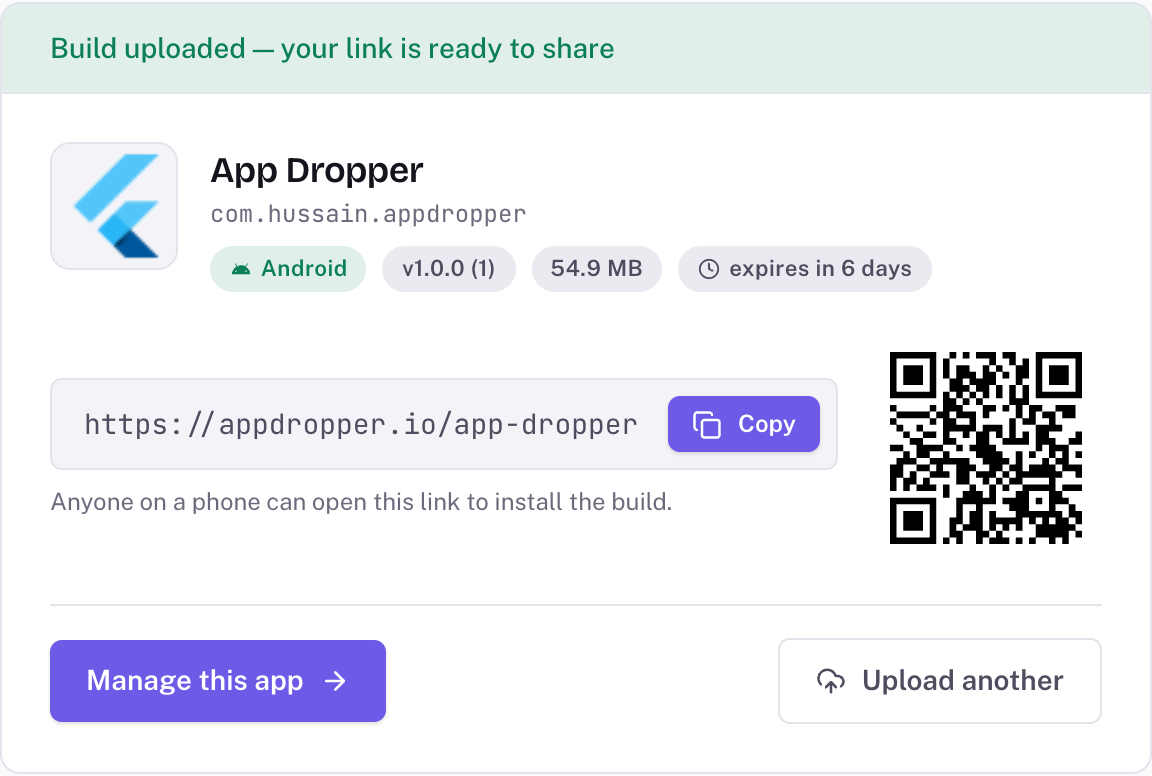
Right after an upload. Nothing here was typed in.
What replaces what?
Only the distribution side of App Center, row by row. Where App Center did more, the table says so.
| App Center Distribution | App Dropper | |
|---|---|---|
| Android builds | App CenterAPK releases shared with distribution groups | App DropperAPK upload. Testers install straight from the phone's browser |
| iOS builds | App CenterIPA releases installed over the air from the App Center install portal | App DropperIPA upload. Testers install over the air from Safari |
| Other platforms | App CentermacOS, Windows (UWP, WPF, WinForms) and custom apps | App DropperNot supported. APK and IPA only |
| Tester access | App CenterDistribution groups, public or limited to signed in members | App DropperPer app: public link, invited testers only, or password protected on Pro and Studio |
| Tester invites | App CenterTesters added to groups by email | App DropperTesters invited by email per app. They accept or decline the invite |
| Install links | App CenterInstall portal pages per app and group | App DropperOne link per app that always opens the newest build, plus a link to each version |
| Release notes | App CenterWritten for each release | App DropperSent from the CLI, API, GitHub Action or Fastlane. Shown on the install page and in the email |
| Version history | App CenterEvery release listed for the app | App DropperEach upload joins the app's history. Free keeps the 5 newest for 7 days; paid plans keep more, for longer |
| New build notifications | App CenterEmail to the group, plus in app update prompts through the App Center SDK | App DropperEmail to every tester, plus push through the App Dropper tester app. No in app update SDK |
| CI uploads | App Centerappcenter CLI, Azure Pipelines task, Fastlane plugin | App Dropperappdropper CLI, GitHub Action, Fastlane plugin, or any CI that runs Node 18 |
| API | App CenterPublic REST API | App DropperREST API with tokens limited to uploading builds for the apps you pick |
| iOS devices | App CenterCollected tester UDIDs, could register them with Apple and sign the build again for you | App DropperReads the UDIDs in the build's profile and shows how many devices can install it. Doesn't collect UDIDs or sign builds |
App Dropper is an app distribution tool. If you used App Center for analytics, crash reporting or cloud builds, you will need separate tools for those parts of your stack. Microsoft lists its suggestions on the App Center retirement page.
The App Center column describes App Center Distribution before its retirement, based on Microsoft’s documentation. App Center and Visual Studio are trademarks of Microsoft. App Dropper isn’t affiliated with Microsoft.
Your link does not change every time you ship
Every upload is matched to a project by its bundle ID. Upload v2.4.0 of com.acme.mobile and it goes into the project that already holds v2.3.1.
The project link stays the same and always opens the newest build. Put it in a Slack channel, a README or a client brief once and leave it there. Older versions are listed underneath, each with its own link, until they expire.
An iOS and an Android build that share a bundle ID land in the same project, so one link works for both. The page offers the build that matches the tester’s phone.
Acme Mobile
com.acme.mobile
v2.3.1 (57)
12 Sepv2.3.0 (54)
3 Sep
Still uploading builds manually?
If your pipeline used to end with an App Center upload step, swap it for one of these. A CI upload lands in the same project as a dashboard upload, and your testers get the same email.
Tokens only upload builds, and only for the apps you pick when you create them. The first upload of a new app happens in the dashboard.
Set up CI uploads covers Codemagic, Bitrise and CircleCI too.
npx appdropper upload build.apk
npx appdropper upload MyApp.ipa --notes "$(git log -1 --pretty=%B)"
Needs Node 18 or newer. Locally, appdropper login signs you in through the browser. In CI, set an API token as APPDROPPER_TOKEN. CLI reference
- name: Upload to App Dropper
  uses: appdropper-io/upload-action@v1
  with:
    file: build/app/outputs/flutter-apk/app-release.apk
    token: ${{ secrets.APPDROPPER_TOKEN }}
    release-notes: ${{ github.event.head_commit.message }}
On a pull request it also comments the install link and QR code. Full workflow examples
# fastlane add_plugin app_dropper
lane :beta do
  build_app(scheme: "MyApp", export_method: "ad-hoc")
  app_dropper(release_notes: last_git_commit[:message])
end
With no file argument it uploads whatever the lane just built. Plugin docs
curl -X POST https://appdropper.io/api/v1/uploads \
  -H "Authorization: Bearer $APPDROPPER_TOKEN" \
  -H "Content-Type: application/json" \
  -d '{"file_name": "app-release.apk", "file_size": 42317884, "release_notes": "Fixes the login crash"}'
This returns an upload URL. You PUT the binary there, then poll GET /v1/uploads/{id} for the install link. API docs
Android and iOS in the same place
Same dashboard, same tester list, same kind of link. What happens on the phone is different for each platform, and it helps to know exactly what.
Android: APK, installed directly
- Testers open the link on their phone and install from the browser. No Play Store listing, no cable.
- The first install asks them to allow installs from that browser. Android does that for any APK from outside Google Play.
- Upload an APK, not an app bundle. A phone can’t install an .aab directly.
- App Dropper checks the build’s signing certificate against Google’s developer verification registry and shows the result on the build.
iOS: IPA, installed over the air
- Testers install from Safari. App Dropper generates the install manifest iOS needs when you upload.
- Apple’s signing rules still apply. The IPA must be signed with an ad hoc, development or enterprise profile. An App Store signed build won’t install this way.
- Ad hoc and development builds only install on devices whose UDIDs are in the profile, up to 100 per device type per membership year. App Dropper reads that list and shows the count on the install page, so an “Unable to Install” error is quick to explain.
- Unlike App Center, it doesn’t collect UDIDs or sign builds again. You add new devices in your Apple Developer account and rebuild. How that works
App Center questions
What replaced Microsoft App Center?
No single product. Microsoft's retirement page recommends a different tool for each service: Azure Pipelines for builds, BrowserStack for device testing, Azure Monitor for analytics, and TestFlight and the Google Play Console testing tracks for distribution. If what you need is to send APK and IPA builds straight to testers without going through a store, App Dropper covers that part.
Is Microsoft App Center discontinued?
Yes, apart from Analytics and Diagnostics. Visual Studio App Center was retired on March 31, 2025, and Build, Test and Distribution stopped with it. Microsoft kept Analytics and Diagnostics running longer. Its retirement page currently says they're supported until the end of March 2027.
When was Visual Studio App Center retired?
On March 31, 2025. Analytics and Diagnostics were extended separately, first to June 30, 2026 and then, in an April 2026 update, to the end of March 2027.
What can I use instead of App Center Distribution?
It depends where the build is going. For builds heading to the stores, TestFlight and the Play Console testing tracks are what Microsoft recommends. For sending builds directly to a known group of testers, you need a distribution service. App Dropper is one: you upload an APK or IPA, get an install link, invite testers by email, and upload new versions to the same link.
Can App Dropper distribute APK files?
Yes. Testers open the link on their Android phone and install from the browser. The first time, Android asks them to allow installs from that browser, which is normal for any APK installed outside Google Play. App bundles (.aab) aren't accepted because a phone can't install one directly.
Can App Dropper distribute IPA files?
Yes, over the air from Safari. The IPA has to be signed with an ad hoc, development or enterprise profile. Ad hoc and development builds only install on devices whose UDIDs are in the profile, so App Dropper reads that list from the build and shows the device count on the install page.
Can I migrate from App Center to App Dropper?
There's no importer, and you don't really need one. Upload your latest APK or IPA and App Dropper creates the project from its bundle ID. Invite your testers by email, or send them the project link. Then replace the App Center upload step in CI with the App Dropper CLI, GitHub Action or Fastlane action. The first upload of each app has to happen in the dashboard, because API tokens can only upload to apps that already exist.
Does App Dropper replace App Center Analytics?
No. App Dropper doesn't do analytics, crash reporting or diagnostics. It shows install counts and tester feedback per build, but you'll need a separate tool for analytics and crashes.
Can I upload builds from CI?
Yes, on every plan. Create an API token in the dashboard, store it as APPDROPPER_TOKEN, and run npx appdropper upload with the path to your build. There's a GitHub Action and a Fastlane plugin, and both use the same REST API you can call yourself.
Your next build does not need App Center
Drop an APK or IPA, get the install link and send it to your testers.